


Stock & Inventory Simple:StoDo
4.7893.00 Reviews
App Specs
- Version
- 2.1.51
- Updated On
- License
- Free
- Downloads
- 1,000,000+
- Developer
- Chester Software (Xaltos Technologies Ltd)
- Categories
- Business
- Platform
- Android
Screenshots
 Analysis by AppCompare
I like Stock and Inventory Simple best when I think of it as a practical stock ledger that lives on a phone, rather than a complete business-management system. It gives a small shop, storeroom, or household a way to keep quantities visible and record items without making inventory feel like a second job. That focus is its strength: it can help me answer everyday questions such as “Do we still have this?” and “What should I restock?” without building a complicated spreadsheet from scratch.
There is a useful middle ground here between counting everything from memory and adopting a heavyweight retail platform. I would consider it for a shop with a manageable range of goods, a small team, or a home collection that has become difficult to track. I would not treat it as a substitute for accounting, purchasing, or a full point-of-sale system. The distinction matters: an inventory app can make stock easier to monitor, but it does not automatically solve every process around selling and replenishing products.
Where a simple stock workflow earns its place
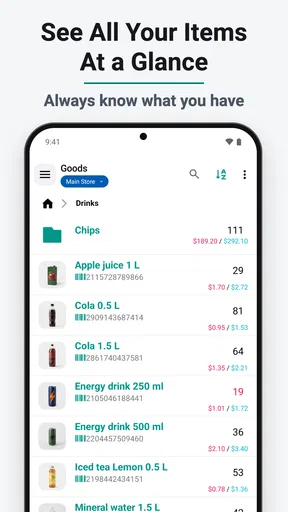
The first practical win is having item details and quantities gathered in one place. In a small store, that can reduce the familiar routine of checking a shelf, trying to remember what sold, and then discovering later that a staple was missed. At home, the same approach can help with supplies stored across a cupboard and a utility room. I find this kind of tool most useful when the alternative is a set of disconnected notes that nobody remembers to update.
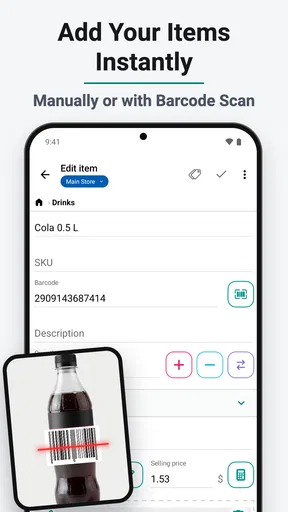
Barcode scanning can make adding or identifying goods quicker, especially when packages already have readable codes. Still, I would not assume every item can be scanned and recognized without any extra work. A barcode is a convenient starting point, not a guarantee that the app knows the product name, unit, or how that item should be organized. For unusual stock, handmade goods, or items without standard packaging, expect to enter useful details yourself and decide on a consistent naming style.
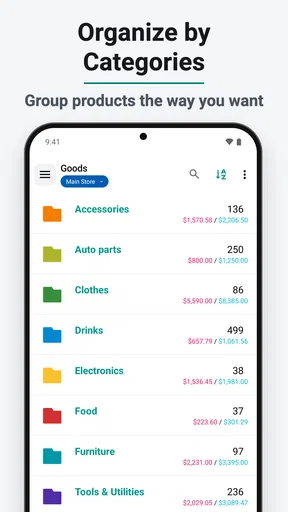
That small bit of discipline pays off later. If one person records “coffee beans” and another enters “beans, coffee” or a brand-specific name, searching and reviewing the list can become less tidy. I would settle on a naming convention before several people begin adding products. For a store, that might mean putting the product type first and using a consistent unit; for household supplies, it could mean grouping items by where they are stored. The app can organize records, but the people using it still determine whether those records stay clear.
What reports and shared access can—and cannot—do
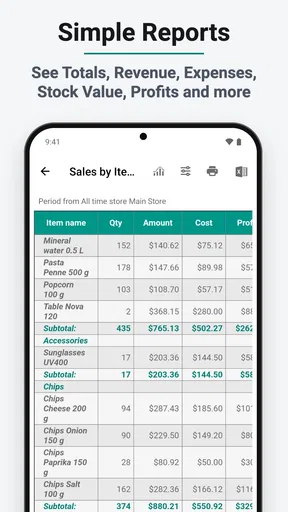
Reports and Excel export are useful when I want to look beyond the current count. A spreadsheet can make it easier to review information alongside other notes or share a snapshot with someone who does not need to work inside the app. I would treat exported figures as a record to inspect, not as a magic explanation of why an item is moving quickly. Reports are only as reliable as the entries behind them, so missed updates or inconsistent units can produce a misleading picture.
Cloud sync and multi-user access also fit a small operation where more than one person handles goods. For example, one worker can update an item after unpacking a delivery while another checks what needs attention later. The useful trade-off is that shared access depends on shared habits: if people update stock at different times or use different conventions, the central list may look current while still being inaccurate. I would agree on a simple routine—record changes when they happen, and periodically compare a few listed quantities with the actual shelves.
Worth Reading Before You Choose

EA SPORTS FC Mobile 26 Is a Bigger Football Game, but It Takes Time

Flipboard Shows What News Apps Must Do Beyond the Feed

Switching to Android Auto Means Rethinking Your Driving Routine

Google Calendar Makes a Crowded Week Easier to Manage

Ludo King Makes the Most of the Minutes Between Plans

Baby Panda World Brings Quick Play to Modern Phones, but Its Game Library Feels Busy
That routine is particularly valuable for products that are easy to overlook because they are small, tucked away, or used irregularly. Rather than trying to audit every item constantly, a shop could check fast-moving essentials more often and review slower stock on a less frequent schedule. The app can keep the information accessible, but a sensible checking rhythm is what turns a digital list into a dependable working tool.
Getting Started with Stock and Inventory Simple
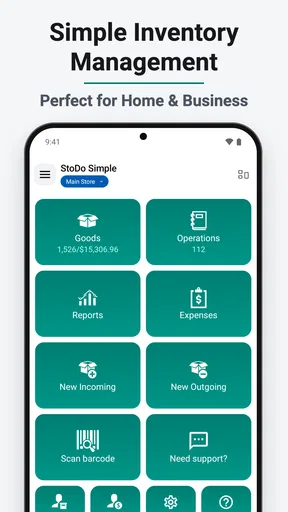
Diving into Stock and Inventory Simple is like stepping into a well-organized closet. You know, the kind where everything has its place and nothing is out of order. The installation was a breeze, and within minutes, I was exploring its features. The interface is clean and intuitive, which is a big plus in my book. I didn’t have to spend ages figuring out where everything was.
Once you open the app, you’re greeted with a dashboard that gives you a quick overview of your inventory status. You can add items, categorize them, and even set minimum stock levels. It’s kind of like having a personal assistant who keeps an eye on your stuff. Pretty cool, right?
Features That Caught My Eye
Okay, let’s talk features because this app has quite a few that are worth mentioning. First up, the barcode scanning feature. Yes, you heard it right—barcode scanning! This makes adding items to your inventory as simple as snapping a pic. You don’t have to manually enter each item, which saves a ton of time.
Another neat feature is the ability to generate reports. Whether you’re looking at sales data or just trying to figure out what’s been flying off the shelves, these reports can provide some valuable insights. Plus, you can export them to Excel, which is super handy if you’re a spreadsheet aficionado like me.
Oh, and did I mention the cloud sync? You can back up your data and access it from any device. So, if you’re working from your phone today and your tablet tomorrow, you’re covered. No more worrying about losing your precious inventory data.
My Experience with Everyday Use
Using the app daily has been a smooth ride. I’ve been able to keep an eye on my stock levels without any hiccups. The alerts for low stock are particularly helpful. I mean, who likes finding out they’re out of something at the last minute? Not me!
The app also offers a multi-user feature, which means you can share access with team members. This is a lifesaver if you’re running a business and need everyone on the same page. It’s like having a shared notebook that updates in real-time.
One realistic way I’d use those minimum-stock alerts is to set a threshold that leaves enough time for a normal restock, rather than setting it so low that the warning arrives when the shelf is nearly empty. A corner shop might choose a different buffer for a popular item than for something that sells only occasionally. I would also review thresholds after observing a few restocking cycles: a number chosen on day one is only a useful guide if it reflects how the shop actually works.
For a small retailer, the day-to-day workflow could be straightforward: add incoming goods, update quantities as items leave, and check low-stock warnings before placing the next order. The benefit is less about sophisticated forecasting and more about making the next action obvious. If a business needs stock counts to trigger supplier orders, reconcile automatically with checkout sales, or feed formal accounting records, I would compare dedicated retail or inventory software before relying on this app alone. A focused stock tracker and a connected business system solve different problems.
Who I’d recommend it to, and where I’d draw the line
The app’s business focus is clear, but its usefulness is not limited to shops. I can see it helping a hobbyist keep track of tools or craft materials, a home organizer monitor pantry and cleaning supplies, or a small team keep a shared list of consumables. These are situations where a person mainly needs to know what exists, where it belongs, and whether the quantity is getting low. For a large warehouse with complex locations, extensive approval steps, or intricate order handling, a basic mobile-first stock workflow may be too narrow.
It is free to install, with in-app purchases ranging from $0.99 to $149.99 per item. I would start with the free experience and decide whether the app fits the way I count and update stock before paying for anything. Since paid items can span a wide range, it is sensible to check the specific purchase details in the app rather than assume every useful feature is included at no cost. The app is rated for Everyone, and its current version is 2.1.48r10; it requires Android 6.0 or later on Android devices.
Chester Software, part of Xaltos Technologies Ltd, has kept this in the business-app space since its release on August 25, 2016. It has a 4.7 average from around 22,000 ratings, with over 1 million installs. Those figures suggest that many people have tried it, but they are not a reason to skip checking whether its workflow suits your own operation. I would focus first on whether the app makes it easy for the people who handle stock to keep records consistent.
Final Thoughts
At the end of the day, Stock and Inventory Simple does exactly what it promises. It’s straightforward, reliable, and packed with features that make inventory management a breeze. Whether you’re a small business owner or just someone who likes to keep things organized, this app is definitely worth checking out.
If you’re interested, you can find it on both Android and iOS, and trust me, you won’t regret giving it a try. It’s like having a little helper in your pocket, always ready to help you stay on top of your inventory game. So, what are you waiting for? Go ahead and download it now and see how it can make your life a little easier.
My recommendation is strongest for someone who wants a readable, shared inventory and is willing to maintain it as part of the normal workday. If you are replacing a scattered set of lists, begin with the handful of products you check most often, choose clear names and units, and see whether the routine feels natural before entering everything. That gives you a fair test without turning setup into a project of its own.
If you already depend on a spreadsheet that is carefully maintained and gives you the views you need, moving may not be worthwhile just for the sake of using an app. On the other hand, when people need to check stock away from a desk or several team members must keep the same list current, a dedicated mobile tool can be more convenient than passing around a file. I would choose based on the real bottleneck: easier updates and shared visibility point toward this app; complex automation and tightly connected sales records point toward a more comprehensive system.
Overall, I see it as a sensible starting point for keeping everyday stock under control, with its best results coming from simple, consistent habits rather than elaborate setup. It is approachable enough for a home inventory and focused enough for a small shop, while still asking the user to be realistic about what an inventory tracker can do. If that balance matches your needs, it is a practical app to try; if your operation has outgrown a shared stock list, I would look for a system built around the larger workflow instead.
Pros
- Easy to navigate interface for beginners.
- Quick setup with minimal configuration.
- Real-time inventory updates.
- Supports barcode scanning for efficiency.
- Cloud backup ensures data safety.
Cons
- Limited customization options.
- No multi-language support.
- Ads in the free version can be distracting.
- Lacks advanced reporting features.
- Requires internet for cloud sync.
FAQs for Stock & Inventory Simple:StoDo
What is Stock and Inventory Simple, and how does it work?
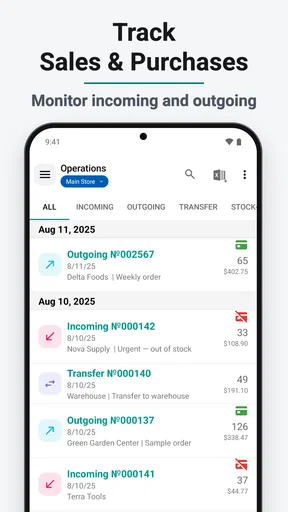
Stock and Inventory Simple is a user-friendly app designed to help businesses and individuals manage their stock and inventory efficiently. The app allows users to track stock levels, manage product categories, and monitor sales and purchases. It's particularly beneficial for small business owners who need a straightforward solution without complex features.
Is Stock and Inventory Simple suitable for small businesses?
Yes, Stock and Inventory Simple is tailored for small businesses and individuals who need a simple yet effective tool to manage their inventory. Its intuitive interface and essential features make it easy to keep track of stock levels, avoiding overstocking or stockouts, which can be critical for small operations.
What are the key features of Stock and Inventory Simple?
Stock and Inventory Simple offers key features such as barcode scanning, product catalog management, and inventory level alerts. Users can also generate detailed reports to analyze sales and stock trends. These features help streamline inventory management without requiring extensive technical knowledge.
How user-friendly is the app for non-technical users?
The app is designed with non-technical users in mind, featuring a clean, intuitive interface that simplifies the inventory management process. Even those with minimal technical expertise can easily navigate the app, making it accessible for anyone looking to improve their stock management practices.
Does Stock and Inventory Simple support multiple platforms?
Stock and Inventory Simple is available on both Android and iOS platforms, ensuring flexibility and accessibility for a wide range of users. This cross-platform support allows users to manage their inventory on the go, using their preferred mobile devices for convenience and efficiency.


